|
|

|

|
|
*Note:
I created the most of the tutorials using the Roboblitz and
Gears of War editors. Based on the engine, and the version,
some properties specified may be in slightly different locations
than what is displayed in the screenshots.
If you need to learn how to create a basic map I would reccomend:
For UT99, UT2K3 & UT2K4: the Unreal
Wiki.
For UT3: Waylon's
Tutorials. |
|
|
|
|
| 
Interactive Events - Emitters
|

I have set up a simple test map consisting of a slab of BSP, a
skylight, a playerstart, a skydome, and a directional light.
I will only be using default editor assets which can be found
in the EditorMeshes and EditorMaterials
packages.
Emitters are fairly simple to deal with in Kismet, but there
are a few things to remember when dealing with them.
1) Is it a 'constant' emitter, or a 'burst' emitter?
In other words, when it's turned on, does it loop/stay on -
like a plume of smoke or a fire that never goes away. Or is
it like a small burst of smoke, or sparks, or something that
goes away after x amount of time? If it's a constant emitter,
and you need to turn it off after x amount of time, simply output
the toggle to a delay, and then loop it back into the off of
the toggle.
2) Is is on when the level starts or not?
This is controlled through the 'AutoActivate' boolean in the
properties of the emitter itself. Basically, either it's on
when the level starts and is turned off later, or it's off when
the level starts and is turned on later.
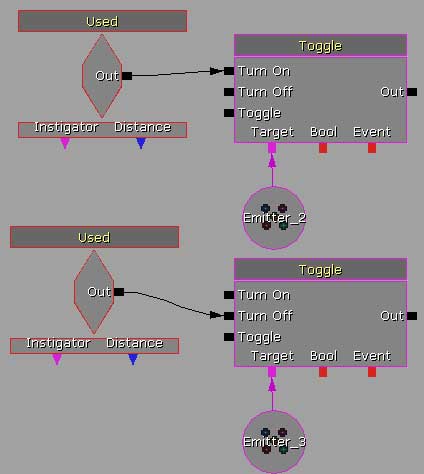
That's about it, really. Use the 'Toggle'
Action to turn them on or off, as shown. Using a toggle can
allow you to turn on/off the emitter as many times as necessary.
|
|
 |
|
|
|







|