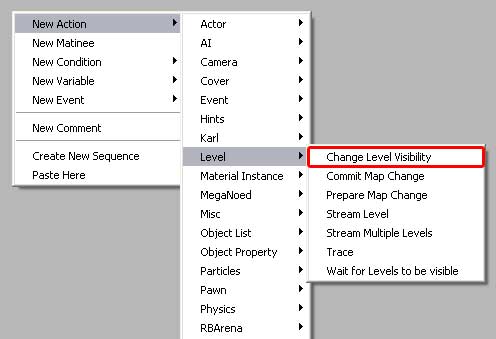
Change Level Visibility is used hide, or unhide,
an entire level. The level could be just script, just decoration,
or anything. And please note, this is different than loading/unloading.
It's like a lightswitch - the level is either 'on' - visibile,
or 'off' - hidden.
This action is commonly used in conjucntion with a level load/unload
action. If you want to load the level before the player gets
to it, but keep it hidden to keep rendering cost down until
the player is even closer, then you can load the level, but
keep it hidden, and then when the player passes, say, a trigger,
you can use this to suddenly unhide the level right before the
player reaches it.
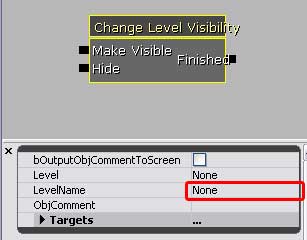
• Make visibile will cause the contents of the level to
be rendered - will allow them into the game.
• Hide will cause the level's contents to dissappear.
|
|
• The level that is to be hidden/unhidden it typed into
the highlighted box, under 'LevelName'. If the level is selectable
in the generic browser, then you could use the 'Level' field
and add a line, and assign the selected level.
|