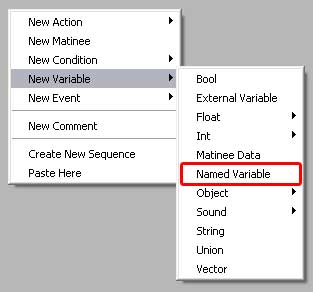
|
Named Variable are used to keep
the same variable data in widely different locations in Kismet
without spaghetti-lines tangling all the other actions/events,
and can also be used in sub-seuqneces. However, they sub-sequences
must be in a lower hierarchy than the variable for them to work.
In other words, a named variable created in a sub-sequence would
not register in the main kismet level.
• Named variables are always Black in Kismet (unless currently
selected as in the figure below) until they are assigned a value,
at which point they will change color to match the type of value.
For example, in the images below, the named variable turned
purple after I 'joined' it to an object variable.
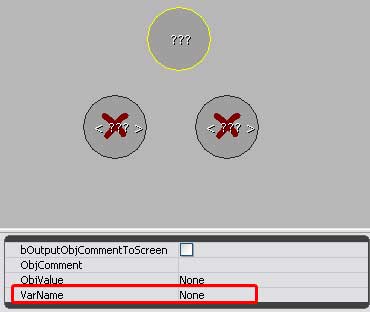
• The Variable Name field is where you assign the Name
of the Named Variable, and is done in the variable you want
the named variable to take the properties of.
In the image below I am going to type 'Test' in the VarName
field of the object.
|
|
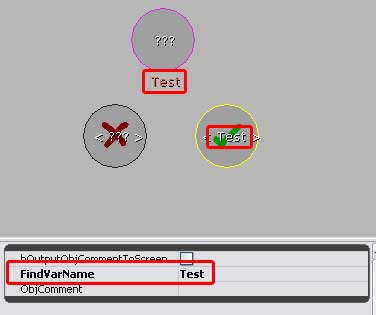
In the image below, I have typed 'Test' into
the 'FindVarName' of the Named Viable. It will 'find' the same
name in the object reference VarName field I typed the word
'Test' into.
Now that the VarName of the object, and the FindVarName field
of the named variable both match, the named variable changes
from a red X to a Green Checkmark, indicating that it will now
work.
• Note: In some versions of UEd, the named variable will
not produce a green checkmark until both the object reference
and the named variable are actually 'hooked' into a kismet system.
In other words, both variables will need to be connected to
actions and kismet closed and then re-opened for the green checkmark
to display.
|
|