|
|

|

|
|
*Note:
I created the most of the tutorials using the Roboblitz and
Gears of War editors. Based on the engine, and the version,
some properties specified may be in slightly different locations
than what is displayed in the screenshots.
If you need to learn how to create a basic map I would reccomend:
For UT99, UT2K3 & UT2K4: the Unreal
Wiki.
For UT3: Waylon's
Tutorials. |
|
|
|
|
| 
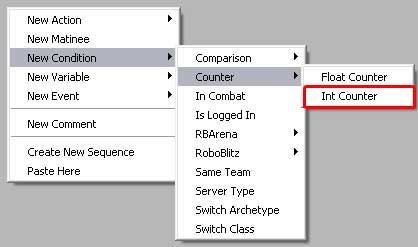
Comparison - Int Counter
|

|
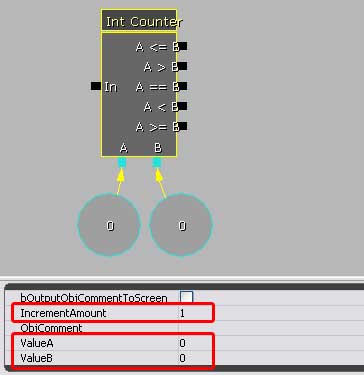
Int Counter is used to do simple
math and output results based on comparisons using integers.
• IncrementAmount: This determines by what factor the
counter will count by. Signals that enter stack on top of each
other by the increment amount and become ValueA. This increment
amount can also be negative.
• ValueA: The initial integer value that is combined with
the increment amount, and then compared to ValueB.
• ValueB: The integer value you will compare to ValueA
and increment amount result.
• Note: It is not necessary to hold the A & B values
in separate references. It is absolutely fine to simply type
them in the ValueA and ValueB fields. But sometimes you need
them separate, for example if you are also performing 'set int'
actions on them.
The functionality is fairly straightforard. A signal enters
the 'In' and the increment amount is added to the ValueA. This
result is compared to B, and then the signal exits via the approprate
node.
In the image below, let's say ValueA = 0 and ValueB = 2 with
an increment amount of 1.
• When a signal #1 enters, it would
add the increment amount, 1, to A, so 0 + 1 = 1. This result,
1, is then compared to B, 2, and the signal would try to leave
via the A < B output.
• When singal # 2 enters, it would add the increment amount,
1, to A, which is still 1 from the previous signal. So 1 + 1
= 2. This result, 2, is then compared to B, 2, and the signal
would try to leave via the A == B output and also the A <=
B and A >= B.
• If a third signal comes in,
it adds 1 (increment amount) to A, which is now 2. 1 + 2 = 3.
And then it compares A to B, or 3 to 2. So the signal would
now exit through the A > B output.
|
|
 |
|
|
|







|